

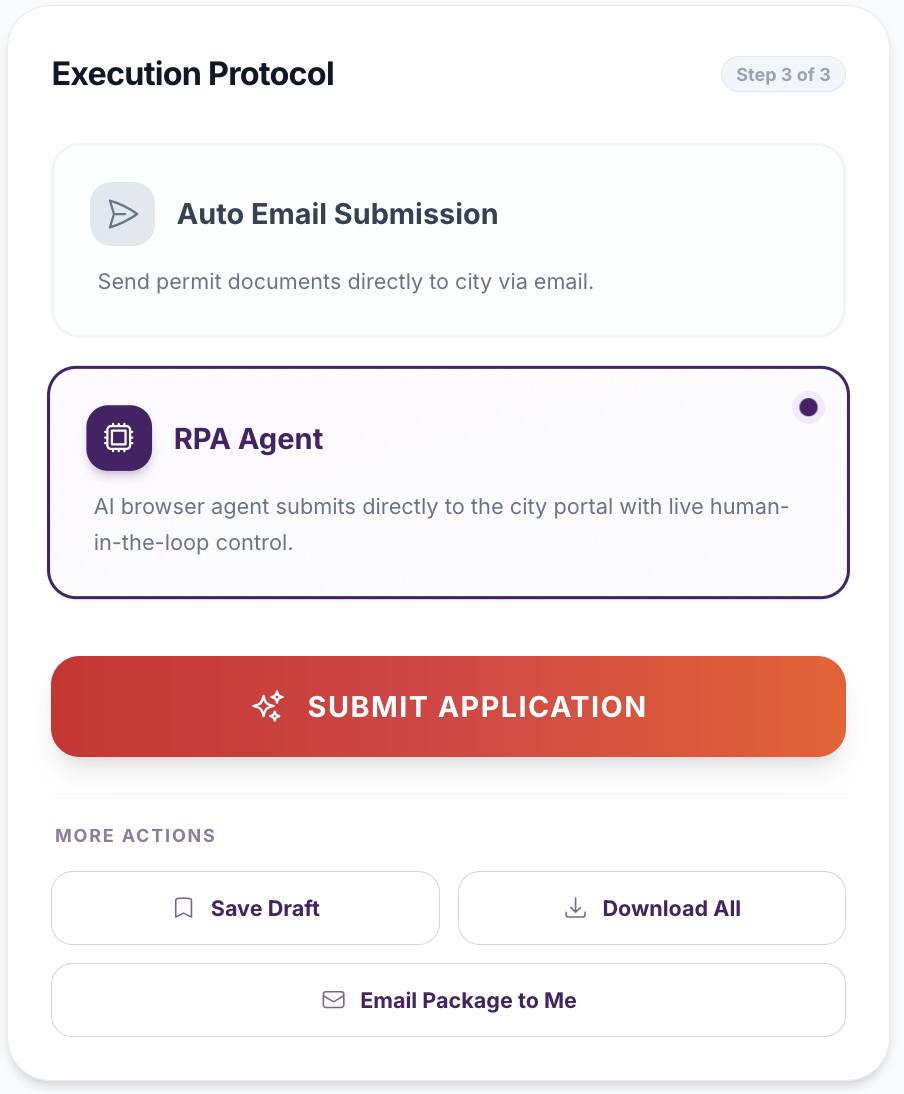
City Submissions takes a complete application (forms signed, drawings reviewed) and delivers it the way your municipality wants it: as an email package with the files combined and named to that city’s conventions, or, in beta, through an automation agent that fills in the municipality’s online portal while you watch and approve every step.
How submission gets done today
By the time an application is ready to file, the hard work is supposedly done. Then the applicant discovers that "filing" is itself a project, and a different one in every municipality.
- Find the channel. Some municipalities accept building permit applications by email to a departmental inbox. Some run an online portal. Some accept both, for different permit types. Sign permits, express services and full building permits may go to different desks in the same city.
- Learn the packaging rules. A large city may want all architectural drawings combined into a single PDF in a prescribed order, mechanical and plumbing drawings as separate sets, and every form renamed to a title its reviewers recognise. A smaller one may want one file per sheet. Get it wrong and intake sends it back.
- Create an account on the portal. Every portal has its own registration, its own project wizard, its own field names for the same facts, and its own upload widget with its own limits.
- Re-enter the application. The portal asks for the address, the owner, the designer, the construction value and the area, one field at a time, even though all of it is already on the forms being uploaded.
- Upload, pay, wait. Then record somewhere that it was submitted, on what date, and under which reference number.
A consultant working in five municipalities maintains five sets of packaging rules and five portal logins, and a homeowner filing once has to learn all of it for a single application.
What the current process costs
| Failure mode | Consequence |
|---|---|
| Drawings combined in the wrong order, or not combined | Package returned by intake; resubmission before the review clock starts |
| Forms named by the designer's convention, not the city's | Reviewer cannot locate a schedule; comment issued for a document that was in the package |
| Application data re-typed into the portal | Transcription errors between the portal record and the forms |
| Sent to the wrong inbox or desk | Days lost while the email is forwarded, or never acknowledged |
| Submission date and reference not recorded | Nobody can say how long the review has taken or quote the file number on a call |
This is the sharp end of the problem Arash Shahi described in Residential Builder: 444 municipalities "independently procuring, implementing and maintaining their own digital permitting systems," producing "hundreds of disconnected approval environments." Each of those environments has its own front door, and the applicant is the only party expected to know where all of them are.
How City Submissions works in Permits2Go
1. The platform tells you where this municipality accepts applications
For municipalities Permits2Go already knows, the submission channel and destination are on file. For a municipality it has not seen before, the platform looks up where that city accepts permit applications, whether an online portal or a departmental email address, checks that the result looks like an official municipal destination rather than a generic homepage or a personal mailbox, and shows you what it found. You confirm before anything is sent, and you can search again if the answer looks wrong.
2. Email packages are assembled to the city's conventions
Choose the email channel and Permits2Go builds the package the way that city expects to receive it. For Toronto that means a package folder named with the address and permit type, the architectural drawings merged into a single drawings file in the order Toronto reviewers read them (site plan, floor plans, elevations, foundation, roof, sections, structural, grading), mechanical and plumbing drawings as their own sets, and each form renamed to the title the city uses for it. Toronto sign permits are routed to the express services desk rather than the general intake inbox. Other municipalities get a consistent, clearly named package. You review the recipient and the file list, then send; the platform emails the package from your application, so the city's reply comes back to you.
3. The portal agent files it while you watch (beta)
Choose the portal channel and a browser session opens inside the application with a live view and a running log. The agent navigates to your municipality's online permit portal, signs in with the credentials you provide (Permits2Go never uses a shared account), starts the application, fills the fields from your project record and uploads the forms and drawings. Municipal portals for more than a hundred Ontario municipalities are supported, along with dedicated handling for Toronto, Brampton and Oakville and for Toronto and Hamilton business licensing.
The agent does not click anything that commits you. Every Continue, Next, Submit, Confirm or Pay button is yours: the agent fills a page, stops, tells you exactly which button it is waiting on, what it has entered so far and what it expects to happen next, and resumes when you say so. Two-factor codes and human verification challenges are handed to you the same way. You can pause and resume at any time, and end the session if anything looks wrong.
4. The record updates itself
When the submission goes out, the application status moves to Submitted, the actual submission date is set, and the city reference number can be recorded as soon as you have it. From that point the dashboard shows days in review, and reviewer calls and comment responses pick up the file.
What you stay in control of
- The destination: you confirm the inbox or portal before anything is sent.
- The credentials: your portal login is used for your submission only; nothing is stored in a shared account.
- Every commit: submit, pay and confirm buttons are always clicked by you, never by the agent.
- The session: pause, resume or end it at any point from the live view.
- Volume: submissions and package emails are limited per day, so a mistake cannot become ten mistakes.
The workflow after
| Step | Before | With City Submissions |
|---|---|---|
| Finding the channel | Search the city website, phone the counter | Known, or looked up and confirmed by you |
| Packaging | Combine and rename by hand per city | Assembled to the city's conventions automatically |
| Portal data entry | Re-typed field by field | Filled from the application while you watch |
| Submit and pay | You | Still you, with the agent stopped at each button |
| Record keeping | A spreadsheet, if anyone remembers | Status, date and reference on the application |
Shahi's platform vision has the system "communicate with reviewing bodies, and track application progress, all within one centralized environment." City Submissions is the applicant-side version: one place to file, whatever front door the municipality happens to have.
Frequently asked questions
Does the automation agent submit the application on its own?
No. The agent fills fields and uploads files on the municipality’s portal, then stops at every button that commits you, such as Continue, Submit, Confirm or Pay, and waits for you to click it. Two-factor codes and human verification challenges are also handed to you. Portal automation is in beta.
Which municipalities can Permits2Go submit to?
Email packages can be sent to any municipality that accepts applications by email, with Toronto-specific packaging and routing built in. The portal agent supports the online permit portals used by more than a hundred Ontario municipalities, plus dedicated handling for Toronto, Brampton and Oakville and for Toronto and Hamilton business licensing. For a municipality the platform has not seen, it looks up the correct destination and asks you to confirm it.
How does Toronto’s package differ from other cities?
Toronto packages use a folder named with the address and permit type, merge the architectural drawings into one file in the order Toronto reviewers read them, keep mechanical and plumbing drawings as separate sets, and rename each form to the title the city uses. Sign permits go to the express services desk. Other municipalities receive a consistent default package.
This guide is general information, not legal or professional advice. Permit requirements, by-laws and fees change and vary by municipality — always confirm the current rules with your local building department before you design or build.
Industry figures cited above are from “Enough is Enough” by Arash Shahi, CEO of LandLogic, published in Residential Builder magazine.