

Review Comment Responses takes the city’s comment letter, review matrix or examiner email and turns it into individual comments on the application, each with its discipline, the reviewer’s exact wording, a suggested response and a status. You approve or rewrite the responses, email a reviewer straight from a comment, and export the response matrix for resubmission.
How review comments get handled today
Weeks after submission, the examiner's comments arrive: a PDF letter, a spreadsheet matrix, or a numbered email, depending on the municipality and the reviewer. From there the applicant's team runs a process that is almost entirely clerical.
- Read and re-type. Each comment is copied into a response table in a word processor or spreadsheet, numbered by hand, and tagged by discipline so it can be sent to the right consultant.
- Distribute. Structural comments to the engineer, zoning comments to the designer, mechanical to the HVAC contractor, by email, with the letter attached again.
- Draft responses. Each consultant replies in their own format. Someone merges the replies back into the table and makes them read consistently.
- Clarify. Two of the comments are ambiguous. Someone phones or emails the examiner and waits.
- Track. Which comments are answered, which are waiting on the engineer, which were resolved on the phone? Colour-coded cells, if anyone keeps them current.
- Resubmit. The response letter goes in with the revised drawings. The next cycle's letter restarts the numbering, and the table is rebuilt.
What the current process costs
| Failure mode | Consequence |
|---|---|
| A comment is missed when the letter is re-typed | The resubmission is returned for the unanswered item; a full extra cycle |
| Responses promise compliance the drawings do not show | The examiner rejects the response; credibility with the reviewer suffers |
| Comment status lives in a spreadsheet nobody updates | Nobody can say whether the file is ready to resubmit |
| Clarification requests go into a personal inbox | The examiner's answer is not on the file; the next person asks again |
| Numbering differs between letter, table and response | The reviewer cannot match answers to comments; more comments |
Comment cycles are the mechanism by which an Ontario permit becomes an 18.4-month approval. Arash Shahi, writing in Residential Builder, argued that a modern platform should reduce "back-and-forth between applicants and staff." The back-and-forth is the comment cycle, and its length is set less by the difficulty of the comments than by how long it takes the applicant's side to organise, answer and track them.
How Review Comment Responses works in Permits2Go
1. Get the comments onto the application
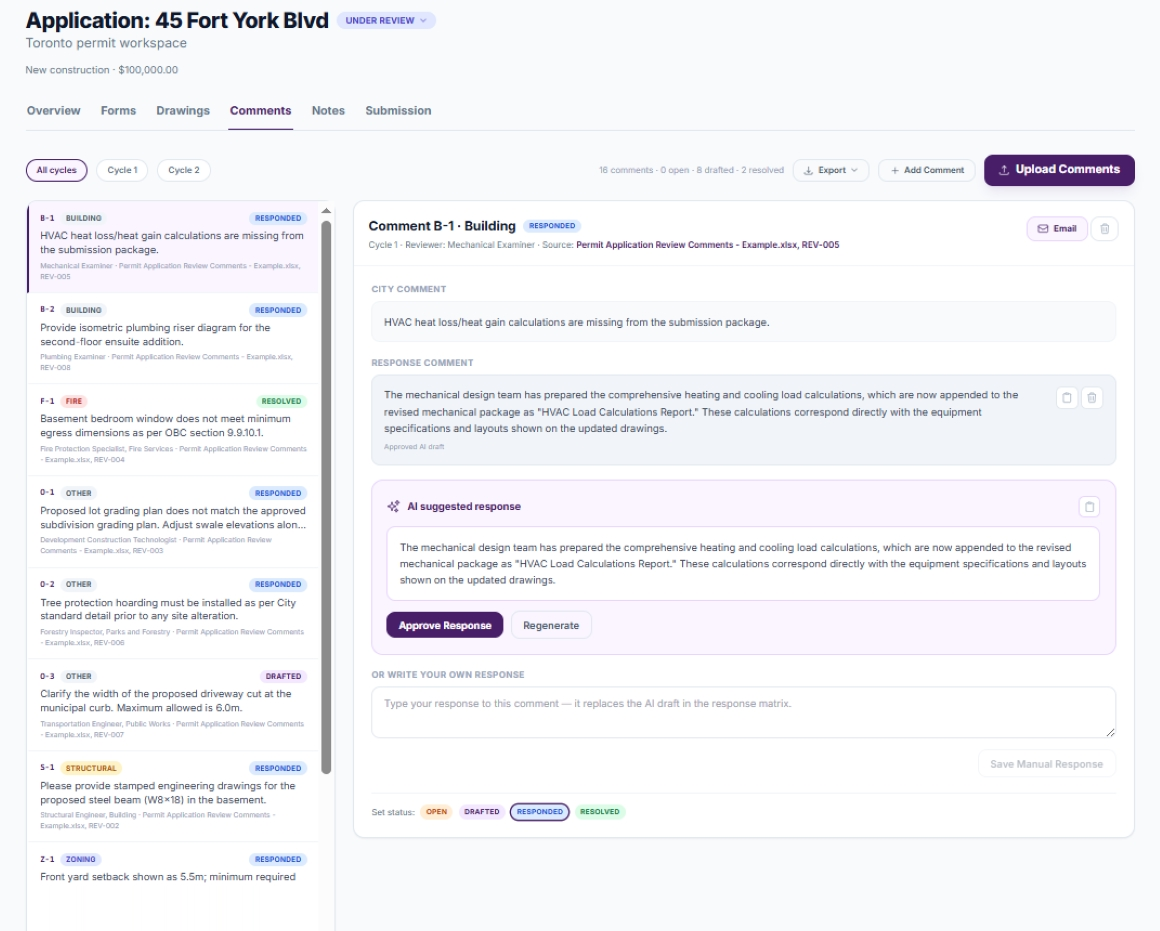
Three ways in. Upload the letter, matrix or email (PDF, Word, Excel or a saved email message) through the Comments tab and pick which review cycle it belongs to. Or forward the city's email to the application's dedicated inbox and it is handled the same way. Or type a comment in by hand if a reviewer gave it to you on the phone.
2. Every comment becomes its own item
The platform reads the document and splits it into individual comments, keeping the city's original order. Each item records the discipline (zoning, structural, fire, building or other), the reviewer's wording exactly as written, the reviewer's name where stated, and where it came from (the page of the letter, the row of the matrix or the subject of the email). Items are numbered by discipline within the review cycle, so structural comments run S-1, S-2, S-3 and a second letter in the same cycle continues the sequence rather than restarting it. Letterheads, signatures and resubmission boilerplate are ignored. If a document contains no comments, the platform says so rather than inventing any.
3. A draft response is ready for each one
Every extracted comment arrives with a short suggested response written in the voice of the applicant's design team. The drafts are deliberately careful: they commit to revising the drawings to address the comment and never promise compliance with a code section that has not been checked. Edit a draft, replace it with your own wording, or ask for a different take on it. The suggested draft and your approved response are always kept apart, and anything sent or exported is labelled as either an approved response or an unapproved draft.
4. Track each item to resolution
Comments move through Open, Drafted, Responded and Resolved. The Comments tab counts them by status, filters by cycle, and shows the open count as a badge on the tab so a file with unanswered comments is obvious from anywhere in the application. Saving a response marks the item Responded; clearing it steps the item back.
5. Email the reviewer from the comment
Open any comment and choose Email. Enter the recipient (the city reviewer, or your engineer if you want their input first) and a message; the comment's code, discipline, cycle, source and exact wording go with it, along with the current response. The application's inbox is copied on the email, so when the reviewer replies, their answer lands on the file automatically as a note rather than in someone's personal mailbox. For questions that need a conversation, the same comments can be selected for an automated reviewer call.
6. Export the response matrix
When the cycle is answered, export the comment table for that cycle as a PDF, Word or Excel document to include with the resubmission. The numbering matches what the examiner wrote, and every response is the one you approved.
What you stay in control of
- No draft is ever sent or exported as a response until you approve it; drafts are labelled as drafts everywhere.
- You choose the recipient of every email and write the message.
- Statuses are yours to set; the platform only moves an item forward when you save a response.
- The reviewer's wording is preserved verbatim, so what you answer is what they asked.
The workflow after
| Step | Before | With Review Comment Responses |
|---|---|---|
| Itemizing the letter | Re-typed into a table by hand | Extracted, numbered by discipline and cycle, wording verbatim |
| First draft of each response | Written from scratch per consultant | Drafted for review, in a consistent voice |
| Status tracking | Coloured spreadsheet cells | Open, Drafted, Responded, Resolved on every item, with counts |
| Clarifying with the examiner | Personal email or phone; answer not on file | Emailed from the comment; reply files back automatically |
| Resubmission matrix | Rebuilt each cycle | Exported per cycle from the tracked items |
The examiner still writes the comments and still decides whether the answers satisfy them. What changes is that no comment is lost, no answer is sent as a promise the drawings cannot keep, and the state of the file is visible to the whole team. Together with Auto-Analyze, which removes the easy comments before the first cycle, the review phase gets shorter from both ends.
Frequently asked questions
Will the platform send responses to the city without my approval?
No. Every comment arrives with a suggested draft that stays separate from your approved response. Nothing is emailed or exported until you choose to send it, you pick the recipient, and any unapproved draft included in an email or export is clearly labelled as a draft.
What formats of comment letter can it read?
PDF letters, Word documents, Excel review matrices and saved email messages, uploaded through the Comments tab or forwarded to the application’s dedicated inbox. Comments given to you by phone can be typed in by hand and take their place in the same numbered list.
How are comments numbered across review cycles?
Each comment gets a code from its discipline and its position within the review cycle, such as Z-1 for the first zoning comment or S-3 for the third structural comment. A second letter in the same cycle continues the sequence, and a new cycle starts a fresh one, so your numbering always matches what the examiner can see.
This guide is general information, not legal or professional advice. Permit requirements, by-laws and fees change and vary by municipality — always confirm the current rules with your local building department before you design or build.
Industry figures cited above are from “Enough is Enough” by Arash Shahi, CEO of LandLogic, published in Residential Builder magazine.