

Auto-Filled Permit Forms takes the official government PDFs your application needs and fills them from the project record and your profile before you open them. What is left is a review: check the draft, complete the few fields the platform could not know, and sign. The forms are the municipality’s own, kept current, so what you submit is exactly what the city expects.
How permit forms get filled today
An Ontario building permit application is a bundle of official PDFs: the provincial Application for a Permit to Construct or Demolish, Schedule 1 with the designer's information and declarations, an energy efficiency design summary, and the municipality's own schedules for zoning, trees, road damage deposits, infill notices, servicing and signs. Filling them is repetitive in a way that invites mistakes.
- Download the current version. From the right municipal page, hoping it is the one intake will accept this month.
- Type the same facts onto each form. Project address, legal description, owner, builder, designer registration numbers, construction value, floor area, phone numbers. A dozen forms, a dozen layouts, the same ten facts.
- Fight the PDF. Some forms have fillable fields, some do not; some fields will not accept the format you typed; some readers do not save what you entered.
- Check for consistency. Did the construction value on the application match the one on the schedule? Is the address written the same way everywhere?
- Print, sign, scan. Or route through a separate signing tool and file the result by hand.
What the current process costs
| Failure mode | Consequence |
|---|---|
| A value differs between two forms | Examiner queries the discrepancy; the application waits on a corrected form |
| An outdated version of a form is used | Returned at intake before the review clock starts |
| A field left blank because it was missed | Incomplete application; resubmission |
| Hours of typing per application | Non-billable time that grows with every schedule the municipality adds |
| Forms filled by hand on paper | Illegible scans and no reusable data |
Arash Shahi's Residential Builder column lists "complete forms automatically" among the things a modern permitting platform should do for the applicant, in a system where hundreds of municipalities maintain their own forms and processes "despite operating under the same provincial legislation." The forms themselves are not going away; the typing can.
How Auto-Filled Permit Forms works in Permits2Go
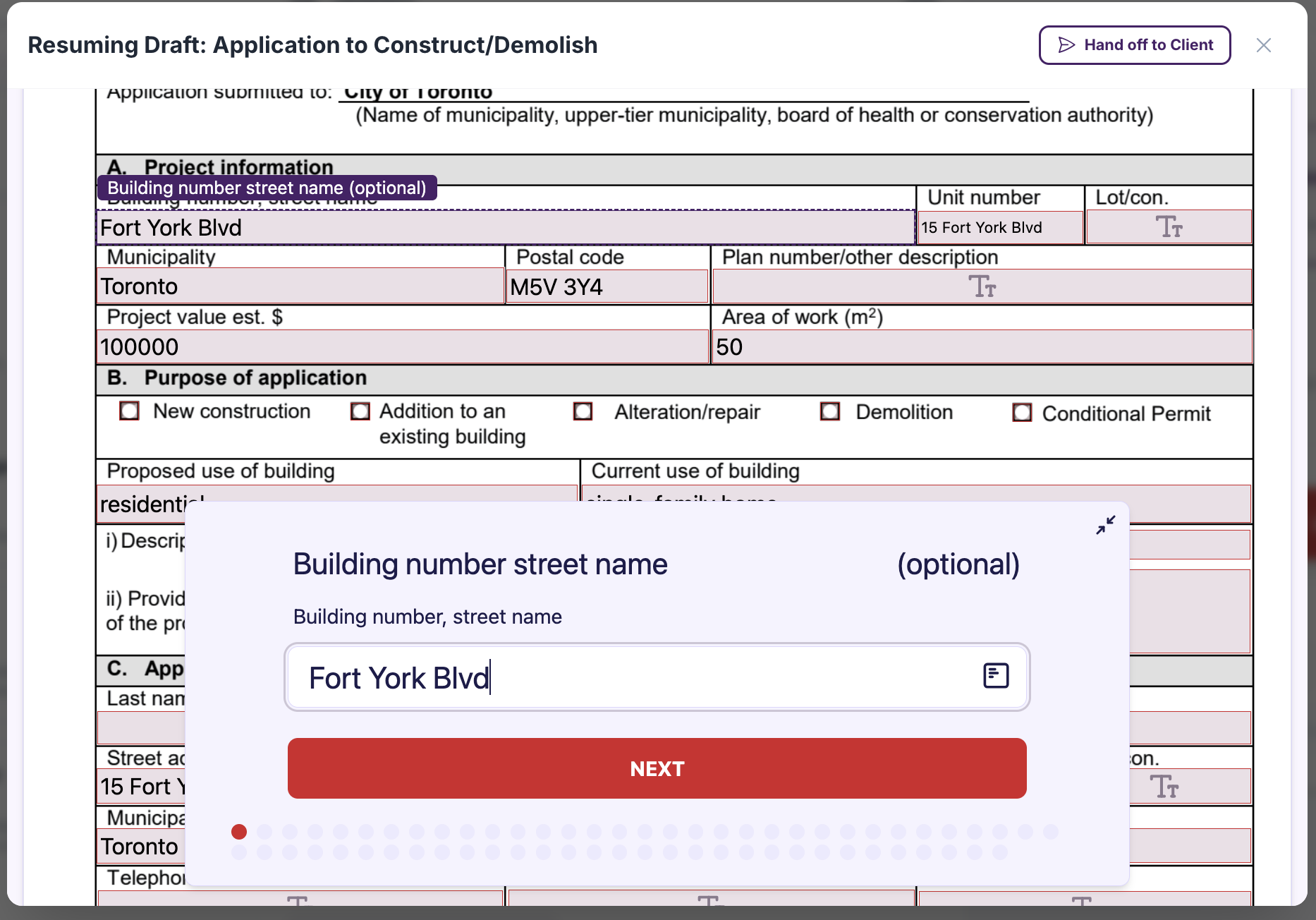
1. The official forms, kept current
The form catalogue holds the municipalities' own PDFs: the provincial application and Schedule 1, Toronto's schedules and sign permit forms, Oakville's and Hamilton's local forms, and the Region of Peel's servicing application, among others. They are maintained centrally, so the version on your application is the version the city publishes, not the one saved on a laptop two years ago.
2. Filled before you open them
When a form is added to an application, whether recommended at intake or picked from the catalogue, it is filled from what the platform already knows: the project address and municipality, the legal description, the owner and builder details from the application and your profile, the designer information for Schedule 1, the purpose of the work, the proposed and current use, the construction value and the area of work. Phone numbers are written in the format the forms expect. The same facts land on every form the same way, so the consistency check happens by construction rather than by proofreading.
3. Review, correct, complete
Open the form in the browser. Every pre-filled field is editable, and the fields the platform could not know (a declaration that only you can make, a value specific to that schedule) are yours to complete. Checkboxes, choices and dropdowns are handled, not just text. What you are doing is correcting a draft, not starting from a blank page.
4. Sign, or send it to the person who must
Sign in the browser and the completed PDF is saved on the application. If the owner or the designer has to sign, send it for signature: they receive the same pre-filled form with the signature fields marked, and the signed copy files itself when they are done.
5. Forms the catalogue does not have
A form the municipality emailed you, or a schedule too local to be in the catalogue, can be uploaded as a custom form. The platform prepares it for filling and signing, and it travels with the application like any other document.
6. Into the package
Completed forms are renamed to each city's conventions and assembled with the drawings when it is time to submit. The dashboard shows which forms are still pending until every one is signed.
What you stay in control of
- Every field is editable; the pre-fill is a draft, and you approve what goes to the city.
- Nothing is submitted from the form itself; submission is a separate step you confirm.
- Declarations and signatures are always yours or your client's, never filled in for you.
The workflow after
| Step | Before | With auto-filled forms |
|---|---|---|
| Finding the current form | Municipal website, each time | Kept current in the catalogue |
| Entering project facts | Typed onto each form | Filled once from the application |
| Consistency across forms | Proofread by hand | Same source, same value everywhere |
| Fillable versus flat PDFs | Print and handwrite the flat ones | All filled and signed in the browser |
| Signatures | Print, sign, scan | Sign in place or send a signing link |
This is the quiet feature underneath several others: form discovery decides which PDFs you need, auto-fill makes them drafts, e-signature finishes them, and city submission packages them. The applicant reads and approves; the process does the typing.
Frequently asked questions
Which details are filled in automatically?
The project address and municipality, the legal description, owner and builder details from the application and your profile, designer information for Schedule 1, the purpose of the work, proposed and current use, construction value and area of work, with phone numbers written the way the forms expect. Fields the platform cannot know are left for you to complete.
Can I change a value the platform filled in?
Yes. Every pre-filled field is editable in the browser. The pre-fill is a draft for you to review; nothing goes to the city until you have checked it and the form is signed and submitted.
What about a form that is not in the catalogue?
Upload it as a custom form. The platform prepares it for filling and signing, and it is filed and packaged with the application like any catalogue form. Forms that already have fields in the catalogue for your municipality, including Toronto’s schedules and the provincial application, are filled automatically.
This guide is general information, not legal or professional advice. Permit requirements, by-laws and fees change and vary by municipality — always confirm the current rules with your local building department before you design or build.
Industry figures cited above are from “Enough is Enough” by Arash Shahi, CEO of LandLogic, published in Residential Builder magazine.